


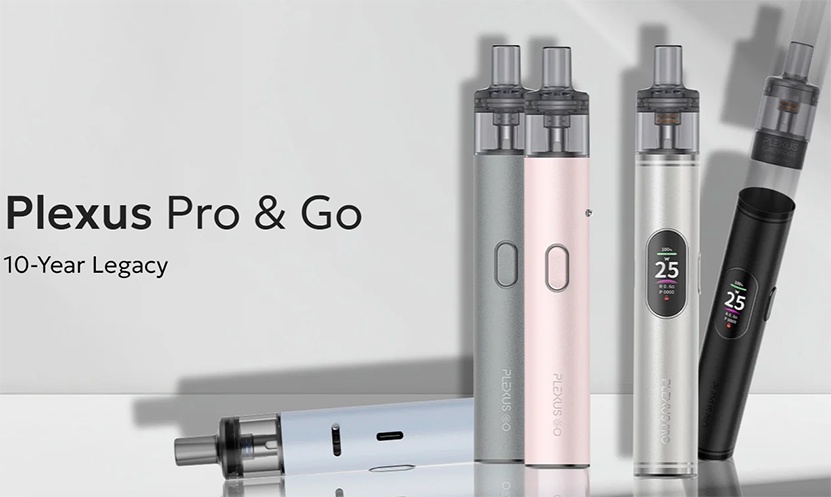
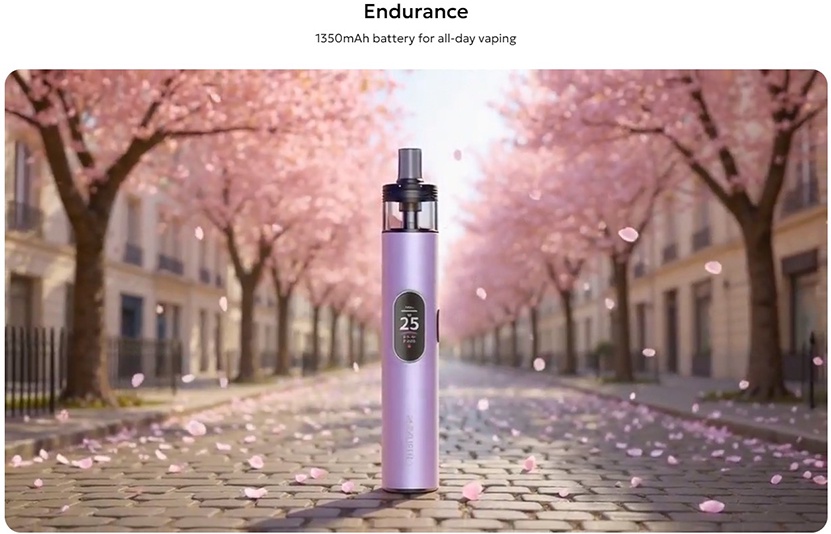
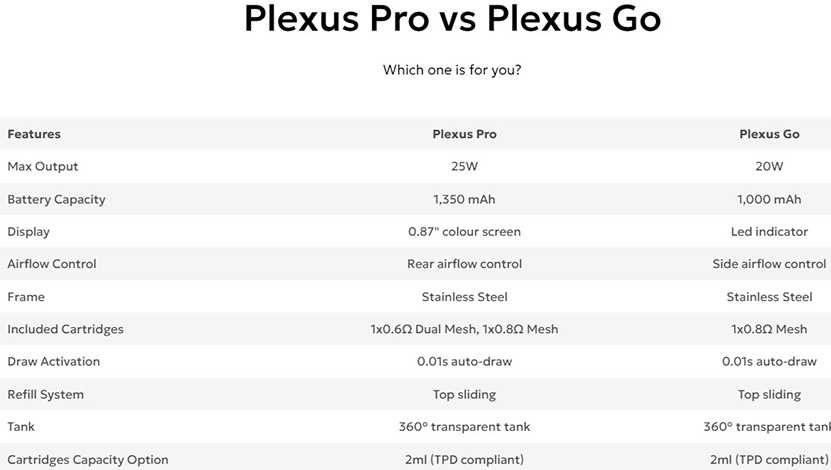
Hello and welcome to another review. Today I’m here to attempt to cover the innokin Plexus Go and Plexus Pro that were sent to me by innokin in order to provide you with a fair and honest review. I’m going to cover both devices in one review since they are similar but with a few differences. The Go version is more simplistic without a display screen and a smaller 1000mah battery capacity. The Plexus Pro does have a display screen and a slightly larger battery capacity of 1350mah. The Go has a maximum output of 20 watts and the Pro has an output of 25 watts. Both have airflow control and can use the same pods.
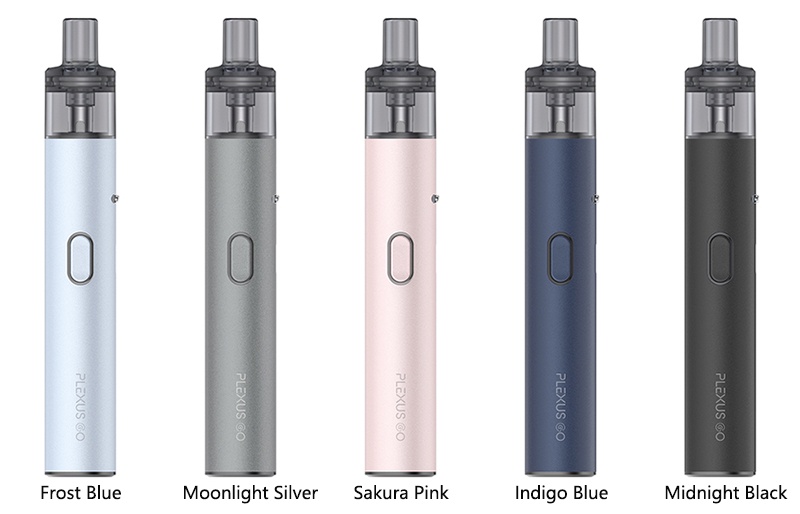
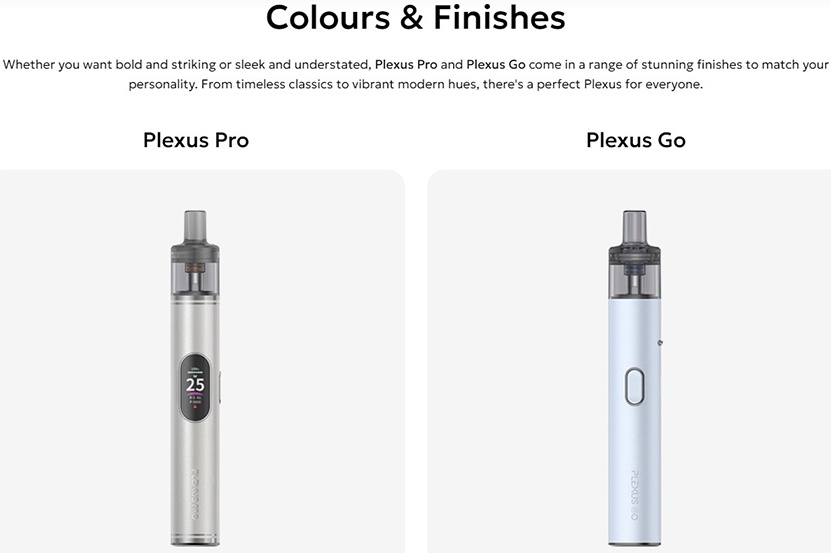
PLEXUS GO COLORS:
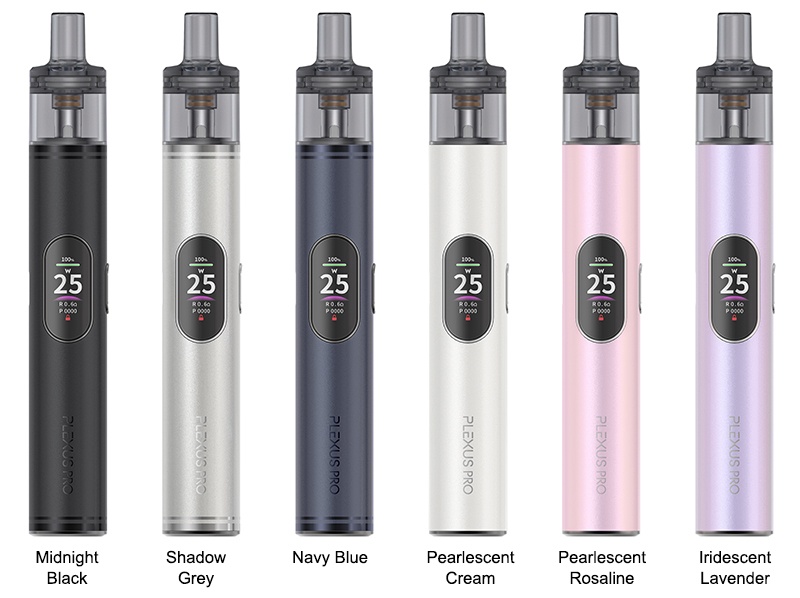
PLEXUS PRO COLORS:
WHAT’S IN THE GO BOX?
1* Plexus Go Device (1000mAh)
1* Plexus Cartridge (2ml/0.8Ω mesh)
1* Quick Guide
WHAT’S IN THE PRO BOX?
1* Plexus Pro Device
1* Plexus 0.6Ω Dual Mesh Cartridge 2ml
1* Plexus 0.8Ω Mesh Cartridge 2ml
1* Quick Guide
PLEXUS GO SPECIFICATIONS:
PLEXUS PRO SPECIFICATIONS:
PLEXUS GO FEATURES:
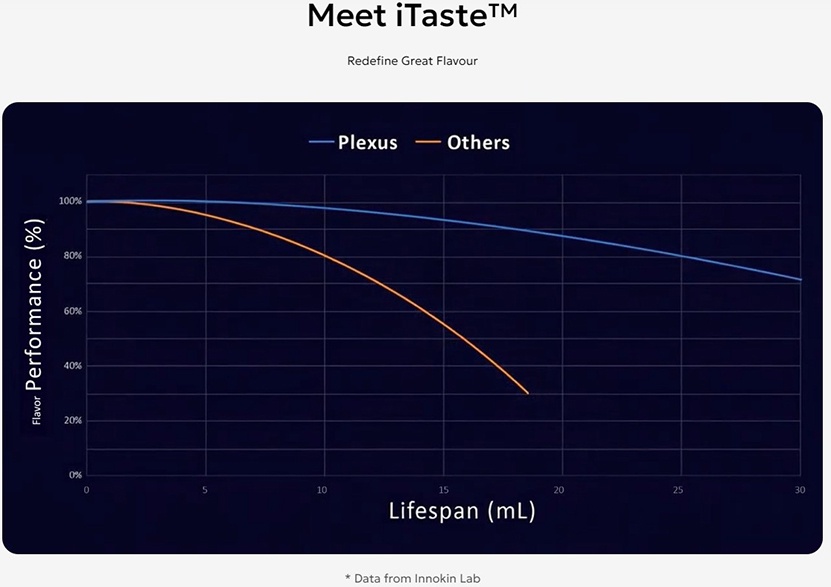
1. Powered by iTaste™ technology
2. 1000mAh battery with 20W max
3. Side airflow control system
4. Battery light indicator
5. 0.01S auto-draw activation
6. 2ml capacity, top-sliding refill
7. Light and portable, stylish and compact
PLEXUS PRO FEATURES:
1. iTaste™ technology
2. 25W max output
3. Rear airflow control
4. 1350mAh battery capacity
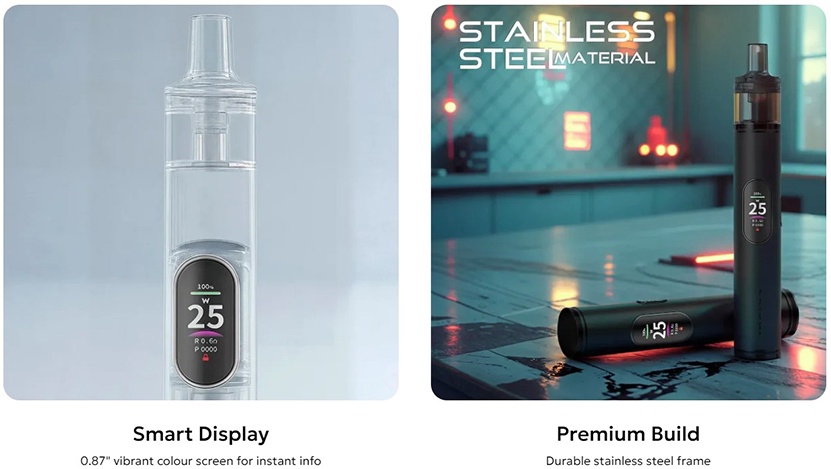
5. 0.87" vibrant color screen
6. Durable stainless steel frame
7. Dual mesh cartridge
8. Top-sliding refill
9. 360° transparent tank for full visibility
INIITIAL THOUGHTS:
Normally I would start out by showing you the packaging of each device but I’m not sure that’s a good idea because the shipping box and the device boxes were badly damaged in shipping. Instead, I think I’ll just give a brief description. Each box has the Innokin and device name on the front with a viewing window showing the actual device. The back side of each box has a contents list and company information. Each device comes sitting in a white foam insert. The Go version only comes with one .8 ohm pod while the Pro version comes with a .6 ohm and a .8 ohm pod. Both also come with a quick start guide. No charging cables are included.
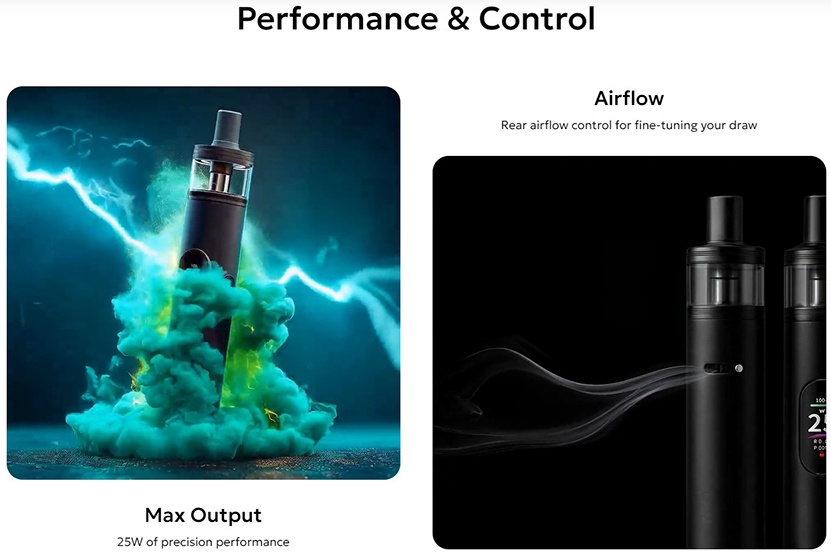
Both the Go and Pro versions of the Plexus come with a sticker around the base with the Plexus name on them. The pods are interchangeable but the Go only comes with one .8 ohm pod while the Pro comes with the .6 and .8 ohm pods. Both have a USB-C charging port on the side as well as the back airflow sliding control. The control has a series of three holes that can be adjust from a very tight MTL to a slightly restricted RDTL. The Go has a maximum output of 20 watts while the Pro has a maximum output of 25 watts. The Go has a 1000mah battery and the Pro has a slightly larger capacity of 1350mah. I kind of expected a “Pro” version to have a larger battery.


The button on the Go version is a long oval shape and it illuminates around the outside of the button to indicate the battery level. The Pro version has a similarly shaped button but is chrome instead of being the color of the body like on the Go. The Pro has the advantage of a .87” smart color display. It has a battery percentage display on top followed by a bar indicator, set wattage, coil resistance, and puff counter. It gives all of the basic information that you might need for a pod device. I am extremely happy that it actually gives a numerical battery percentage instead of just an indicator bar. The operation of the Pro is as follows.


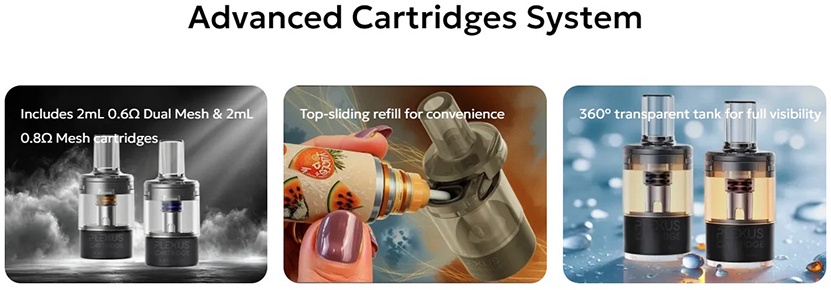
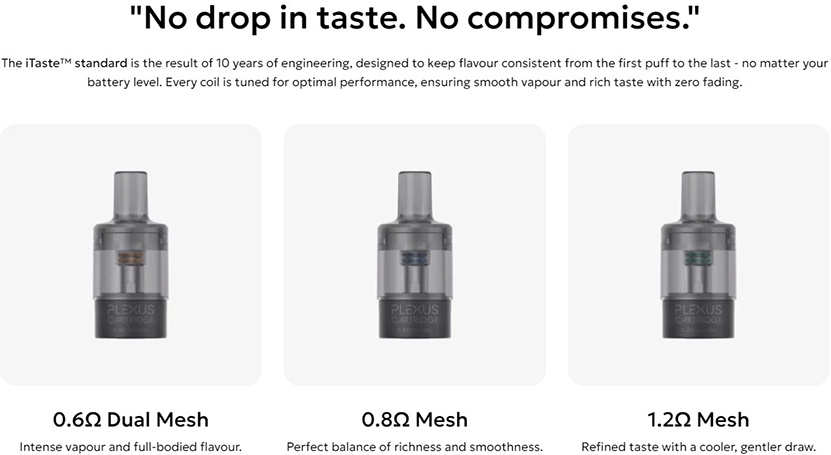
The pods for the Plexus Pro and Go are semi clear and the liquid level can be fairly easily seen. When first received, there is a sticker covering the bottom of the pod to prevent accidental firing. The pod and pod opening on the Plexus devices have two magnets each to hold the pods in place securely. The pod opening on the device has two plated spring loaded contacts.
The pods have the Plexus name as well as the rated resistance clearly printed on the side of the pods. One thing I very much like about these pods is that the top has a little arrow on it indicating which direction to push in order to slide the molded top in order to expose the fill port. I very much like this design and the pods can be filled easily with no mess.


FINAL THOUGHTS:
Over all, I was very pleased with the performance of the Plexus Go and Plexus Pro that were sent to me by Innokin for this review. The stainless steel body of the devices gives a nice feeling of a quality device and seems durable. I can see where the Go version would be better for someone who is switching to vaping from smoking or disposables to a refillable device. It’s a very simplistic but good performing device. The Pro is more targeted for someone who is a little more experience and likes to see information about their vape and has the option of using the higher output .6 ohm pods.
I found the .8 ohm pod on the Go to be a really good MTL pod with the airflow closed down to about one airflow hole exposed. The battery life seemed very good and honestly I lost track of how many times I refilled the pod. I preferred the .6 ohm pod with the Pro version. The Pro defaulted to 20 watts with this pod but I quickly worked my way up to the maximum of 25 watts. The flavor was pretty good and the vapor production was acceptable. I kind of wish that the Pro went up to the 30 watt mark because I felt like the .6 ohm pod could be pushed to a higher wattage to really open up the flavor.
As usual, it has been a pleasure providing a review for another quality made Innokin product and would like to thank Innokin and Alisa for sending the samples. A big thanks also to you the readers for taking time out of your busy schedule to read my review. Below is a link to the Innokin website for your viewing pleasure.
Plexus Go & Pro - Vape Kit | INNOKIN®
PLEXUS GO COLORS:
PLEXUS PRO COLORS:
WHAT’S IN THE GO BOX?
1* Plexus Go Device (1000mAh)
1* Plexus Cartridge (2ml/0.8Ω mesh)
1* Quick Guide
WHAT’S IN THE PRO BOX?
1* Plexus Pro Device
1* Plexus 0.6Ω Dual Mesh Cartridge 2ml
1* Plexus 0.8Ω Mesh Cartridge 2ml
1* Quick Guide
PLEXUS GO SPECIFICATIONS:
| Brand | Innokin |
| Product Name | Plexus Go Kit |
| Battery Capacity | 1000mAh |
| Max Output | 20W |
| Display | LED indicator |
| Airflow | Side airflow control |
| Included Cartridge | Plexus 0.8Ω Cartridge |
| Draw Activation | 0.01s auto-draw |
| Pod Capacity | 2ml |
| Filling | Top filling |
| Color | Frost Blue, Indigo Blue, Moonlight Silver, Midnight Black, Sakura Pink |
PLEXUS PRO SPECIFICATIONS:
| Brand | Innokin |
| Product Name | Plexus Pro Kit |
| Max Output | 25W max |
| Battery | 1350mAh |
| Display | 0.87" color screen |
| Airflow Control | Rear airflow control |
| Frame | 304 Stainless Steel |
| Included Cartridge | 1x 0.6Ω Dual Mesh, 1x 0.8Ω Mesh |
| Refill System | Top-sliding refill |
| Capacity | 2ml |
| Color | Midnight Black, Navy Blue, Shadow Grey, Pearlescent Cream, Pearlescent Rosaline, Iridescent Lavender |
| Packing Size | 70*25*145mm (1pc) |
| Carton Size | 39*35.5*28.5cm (130pcs, approx. 16.78kg) |
PLEXUS GO FEATURES:
1. Powered by iTaste™ technology
2. 1000mAh battery with 20W max
3. Side airflow control system
4. Battery light indicator
5. 0.01S auto-draw activation
6. 2ml capacity, top-sliding refill
7. Light and portable, stylish and compact
PLEXUS PRO FEATURES:
1. iTaste™ technology
2. 25W max output
3. Rear airflow control
4. 1350mAh battery capacity
5. 0.87" vibrant color screen
6. Durable stainless steel frame
7. Dual mesh cartridge
8. Top-sliding refill
9. 360° transparent tank for full visibility
INIITIAL THOUGHTS:
Normally I would start out by showing you the packaging of each device but I’m not sure that’s a good idea because the shipping box and the device boxes were badly damaged in shipping. Instead, I think I’ll just give a brief description. Each box has the Innokin and device name on the front with a viewing window showing the actual device. The back side of each box has a contents list and company information. Each device comes sitting in a white foam insert. The Go version only comes with one .8 ohm pod while the Pro version comes with a .6 ohm and a .8 ohm pod. Both also come with a quick start guide. No charging cables are included.
Both the Go and Pro versions of the Plexus come with a sticker around the base with the Plexus name on them. The pods are interchangeable but the Go only comes with one .8 ohm pod while the Pro comes with the .6 and .8 ohm pods. Both have a USB-C charging port on the side as well as the back airflow sliding control. The control has a series of three holes that can be adjust from a very tight MTL to a slightly restricted RDTL. The Go has a maximum output of 20 watts while the Pro has a maximum output of 25 watts. The Go has a 1000mah battery and the Pro has a slightly larger capacity of 1350mah. I kind of expected a “Pro” version to have a larger battery.
The button on the Go version is a long oval shape and it illuminates around the outside of the button to indicate the battery level. The Pro version has a similarly shaped button but is chrome instead of being the color of the body like on the Go. The Pro has the advantage of a .87” smart color display. It has a battery percentage display on top followed by a bar indicator, set wattage, coil resistance, and puff counter. It gives all of the basic information that you might need for a pod device. I am extremely happy that it actually gives a numerical battery percentage instead of just an indicator bar. The operation of the Pro is as follows.
- Press the fire button 5X to turn the device on/off
- Press the fire button 3X to change the wattage
- Press the fire button 4X to lock the button so it is only auto draw
- After 10 minutes of inactivity, the locking function automatically kicks in to prevent accidental firing by pressing the button.
The pods for the Plexus Pro and Go are semi clear and the liquid level can be fairly easily seen. When first received, there is a sticker covering the bottom of the pod to prevent accidental firing. The pod and pod opening on the Plexus devices have two magnets each to hold the pods in place securely. The pod opening on the device has two plated spring loaded contacts.
The pods have the Plexus name as well as the rated resistance clearly printed on the side of the pods. One thing I very much like about these pods is that the top has a little arrow on it indicating which direction to push in order to slide the molded top in order to expose the fill port. I very much like this design and the pods can be filled easily with no mess.
FINAL THOUGHTS:
Over all, I was very pleased with the performance of the Plexus Go and Plexus Pro that were sent to me by Innokin for this review. The stainless steel body of the devices gives a nice feeling of a quality device and seems durable. I can see where the Go version would be better for someone who is switching to vaping from smoking or disposables to a refillable device. It’s a very simplistic but good performing device. The Pro is more targeted for someone who is a little more experience and likes to see information about their vape and has the option of using the higher output .6 ohm pods.
I found the .8 ohm pod on the Go to be a really good MTL pod with the airflow closed down to about one airflow hole exposed. The battery life seemed very good and honestly I lost track of how many times I refilled the pod. I preferred the .6 ohm pod with the Pro version. The Pro defaulted to 20 watts with this pod but I quickly worked my way up to the maximum of 25 watts. The flavor was pretty good and the vapor production was acceptable. I kind of wish that the Pro went up to the 30 watt mark because I felt like the .6 ohm pod could be pushed to a higher wattage to really open up the flavor.
As usual, it has been a pleasure providing a review for another quality made Innokin product and would like to thank Innokin and Alisa for sending the samples. A big thanks also to you the readers for taking time out of your busy schedule to read my review. Below is a link to the Innokin website for your viewing pleasure.
Plexus Go & Pro - Vape Kit | INNOKIN®